
AudioService Sun Li-Ion 16 G4 | Battery, Charger & Compatibility Guide
If you’re looking for the right AudioService Sun Li-Ion 16 G4 accessories, you’re usually trying to solve one thing: keep your rechargeable hearing aids powered reliably—with the correct charger, cable, and care routine. This guide explains how AudioService Sun Li-Ion 16 G4 charging compatibility works, what to check before you buy, and how to avoid the most common charging problems.
What “Li-Ion” means for AudioService Sun Li-Ion 16 G4 accessories
AudioService Sun Li-Ion 16 G4 models use an built-in lithium-ion (Li‑ion) rechargeable battery. That means you typically won’t buy disposable batteries for this model. Instead, the most important accessories are those related to charging and daily power management, such as a compatible charger or charging station, power supply/cable (depending on charger type), and cleaning items that help keep the charging contacts working properly.
AudioService Sun Li-Ion 16 G4 charger compatibility: what to check
Rechargeable hearing aid chargers are not universally interchangeable across brands and generations. To make sure you pick the correct option for AudioService Sun Li-Ion 16 G4, check the following:
1) Exact model and generation (G4)
AudioService accessories can differ by platform/generation. Because this page is specific to Sun Li-Ion 16 G4, choose chargers and parts that explicitly mention AudioService Sun and/or G4 compatibility in the product title or specifications.
2) Charging style and form factor
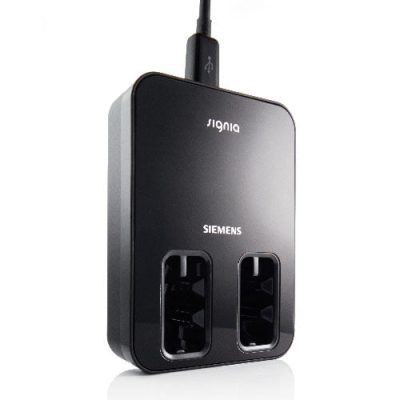
Some solutions are simple desktop chargers, while others are charging cases or stations with different features. The right choice depends on how and where you charge:
Home/nightstand charging: prioritize a stable base and easy insertion/removal.
Travel charging: choose a compact charger or case solution if available for your model.
Ease of handling: if you have reduced dexterity, a charger with clear alignment and strong “seat” feel can help.
3) Power connection (cable/adapter)
Even when the hearing aids are compatible with a charger, the power cable or adapter can vary by charger version. If your current charger is missing parts, verify whether you need:
a replacement USB cable,
a power adapter,
or a complete charger set.
How to choose the right AudioService Sun Li-Ion 16 G4 accessory
If you’re unsure what to buy, these quick questions usually pinpoint the correct accessory:
Do you need a full charger or only a part? If your charger works intermittently or is physically damaged, a complete replacement is often the safest route.
Is the issue “not charging” or “not holding charge”? Not charging often points to contacts, dirt, or a charger/power issue. Short runtime may indicate battery ageing or usage changes (streaming, higher amplification).
Do you charge mainly at home or on the go? Choose a charger that fits your routine—stable and easy at home, compact for travel.
Common AudioService Sun Li-Ion 16 G4 charging problems (and what to do)
The hearing aids don’t start charging
Check seating: remove and re-insert the hearing aids so they sit correctly in the charger.
Inspect and clean contacts: gently remove dust or debris from the charging contacts (both charger and hearing aids) using a dry, soft cloth. Avoid liquids unless the manufacturer specifically recommends it.
Verify power: try a different wall socket and confirm the cable/adapter is firmly connected.
Charging is inconsistent (sometimes works, sometimes doesn’t)
Worn cable or loose connector: if wiggling the cable affects charging, replace the cable/adapter.
Dirty contact points: even a thin film of skin oils or debris can prevent reliable contact—regular dry cleaning helps.
Battery drains faster than expected
Streaming increases consumption: frequent Bluetooth/TV streaming can significantly reduce runtime.
Battery ageing: Li‑ion batteries can lose capacity over time. If runtime has dropped noticeably, ask your hearing care professional about battery service options for your model.
Buying AudioService Sun Li-Ion 16 G4 accessories online (what to look for)
When shopping for AudioService Sun Li-Ion 16 G4 accessories, prioritize listings that clearly state:
Compatibility with AudioService Sun Li-Ion and ideally G4
Whether the item is a complete charger or a replacement part (cable/adapter)
What’s included in the box
If you’re in doubt between two similar-looking chargers, choose the one with the clearest compatibility statement for AudioService Sun Li-Ion 16 G4, or match the charger/model number from your existing unit.
FAQ: AudioService Sun Li-Ion 16 G4
Do AudioService Sun Li-Ion 16 G4 hearing aids use disposable batteries?
No. Li-Ion indicates an internal rechargeable battery system. The relevant accessories are chargers and charging-related parts rather than disposable batteries.
Can I use any hearing aid charger with AudioService Sun Li-Ion 16 G4?
No. Chargers are typically brand- and model/generation-specific. Use a charger explicitly listed as compatible with AudioService Sun Li-Ion (and preferably G4).
What if my hearing aids won’t charge even with a working charger?
First clean and check the charging contacts and verify the power source. If the problem persists, the hearing aids may need service. A hearing care professional can confirm whether it’s a battery/contact fault or a charger recognition issue.
What’s the safest way to identify the right charger?
Match the exact hearing aid family name (AudioService Sun Li-Ion) and the generation (G4), and compare the charger model/part number from your existing charger if possible.