
Unitron Moda II Hearing Aid Accessories | Compatibility Guide & Parts
If you’re looking for Unitron Moda II hearing aid accessories, the most important thing is compatibility. Small parts like domes, wax filters, and receivers are not universal—even within Unitron—and choosing the wrong type can lead to poor fit, feedback (whistling), reduced sound quality, or frequent dropouts. This guide helps you identify what typically fits Unitron Moda II, how to choose the right option, and what to do if you’re unsure before ordering.
What “Unitron Moda II accessories” usually covers
Most day-to-day replacement accessories for Unitron Moda II fall into a few categories. Each category solves a different problem, so it helps to know what you’re replacing:
Domes: Soft ear tips that sit in the ear canal. They affect comfort, retention (how well the aid stays in place), and sound (especially bass).
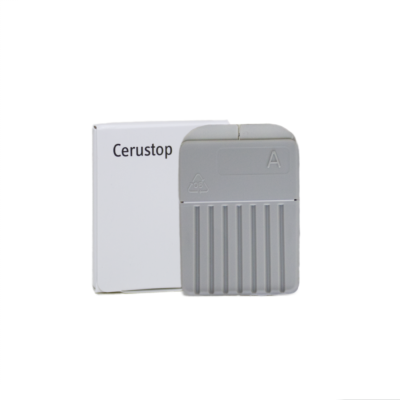
Wax filters / guards: Small filters that protect the speaker from earwax and moisture. A clogged filter is a very common cause of weak or muffled sound.
Receivers (speaker units): The part that delivers sound into the ear (common in RIC styles). Receivers come in different power levels and lengths.
Retention locks / sports locks: Small flexible pieces that help keep the dome and receiver stable in the ear.
Cleaning & care items: Cleaning tools and drying solutions that help keep sound outlets clear and extend accessory life.
How compatibility works for Unitron Moda II
Unitron accessories are determined by your exact hearing aid configuration rather than the name alone. With Unitron Moda II, the correct accessory typically depends on:
Hearing aid style: RIC (receiver-in-canal) vs. other fittings. RIC fittings use receivers and domes most often.
Receiver system: Unitron uses specific receiver platforms; the receiver type must match your device and cable connection.
Receiver length (left/right): Many receivers are ordered by length and side. The wrong length can cause poor placement and comfort issues.
Dome interface: Domes must match the receiver’s nozzle style/diameter (different families of domes are not interchangeable).
Wax protection type: Wax filter systems vary. Using the wrong filter can block sound or fail to protect the receiver.
If you already have a used dome/filter/receiver, the safest method is to match what you have now (same style name and size). If you don’t, use the selection tips below.
Choosing the right Unitron Moda II domes
Domes are the most frequently replaced accessory. The “right” dome balances comfort, secure fit, and acoustics. When selecting Unitron Moda II domes, focus on these factors:
Open vs. closed vs. power domes
Open domes: Best when you want a more “open” feel and less occlusion. Often used with milder low-frequency loss. Can reduce the sensation of a plugged ear.
Closed domes: Provide more sealing and can improve bass and overall gain, but may feel more occluding.
Power domes (double domes): Maximum seal for higher amplification needs; may increase occlusion and require careful fit to avoid discomfort.
Getting the right size
Dome sizes typically range from small to large. If the dome feels loose, whistles, or slips out, go one size up. If it feels sore or causes pressure, go one size down or switch to a different dome style. A correct size should feel stable without pain and should not whistle during normal jaw movement.
Common dome-related problems (and quick fixes)
Whistling (feedback): Try a larger dome size, a more closed style, or check for poor insertion depth. Also inspect for cracked domes.
Muffled sound: Often wax filter blockage rather than the dome—check the filter first.
Dome keeps falling off: Confirm you’re using the correct dome family for your receiver nozzle and replace stretched/old domes.
Unitron Moda II wax filters: when to replace and how to choose
Wax filters (wax guards) are designed to be replaced regularly. If your Unitron Moda II suddenly sounds weak, dull, or intermittent, a clogged wax filter is the first thing to check.
Replace the wax filter if: sound is reduced, the filter looks discolored/blocked, or you’re troubleshooting one-sided sound issues.
Choose the correct filter type: Wax filters must match the receiver/speaker design. If you insert the wrong style, it may not seat correctly and can block the sound outlet.
If you’re unsure which wax filter fits your Unitron Moda II, match the exact filter you’re currently using or check your hearing aid paperwork. When in doubt, identify the receiver model first—wax filter type often follows the receiver platform.
Unitron Moda II receivers (speakers): what matters
Receivers are not one-size-fits-all. For Unitron Moda II, you must match:
Receiver type/platform: The connector must match the hearing aid body.
Power level: Receivers come in power variants (e.g., standard vs. higher power). Using the wrong power can change sound output and may not match your fitting.
Length and side: Left/right and the correct cable length are essential for comfort and sound delivery.
Replace the receiver if you have persistent distortion, crackling, or sound cut-outs that remain after changing the wax filter and dome and after cleaning the sound outlet.
How to confirm you’re buying the correct Unitron Moda II accessory
Use this quick checklist before you order:
Identify what you need: dome, wax filter, receiver, or retention lock.
Match your current part: same style and size (best method).
Check receiver details (if applicable): platform/type, side (L/R), and length.
Confirm the wax filter system: only buy the exact type designed for your receiver.
When unsure: choose guidance-first—start with wax filters and domes if the issue is sound quality, then consider receivers.
Where to buy Unitron Moda II accessories
Once you’ve confirmed compatibility, you can confidently shop for Unitron Moda II accessories such as domes, wax filters, and receivers. Replacing these parts on time helps keep sound clear, reduces feedback, and can prevent avoidable receiver damage from wax and moisture.
FAQ: Unitron Moda II accessories
Are Unitron domes universal across models?
No. Unitron domes must match the receiver/nozzle type. Even if a dome looks similar, a different dome family may not attach securely or may change acoustics.
My Unitron Moda II is muffled—do I need a new receiver?
Usually not. First replace the wax filter and check for blocked sound outlets. If sound remains distorted or cuts out after changing filters and domes, the receiver may be the next step.
How often should I replace Unitron Moda II wax filters?
It varies by earwax and moisture exposure, but many users replace wax filters every few weeks to months. Replace immediately if sound drops or becomes dull.
What dome type should I choose: open or closed?
Open domes feel more natural and reduce occlusion, while closed/power domes provide more seal and can support stronger amplification. If you get feedback or need more bass, a more closed dome may help.
How do I know my receiver length?
Receiver length is typically marked on the receiver or documented in your fitting details. If you can’t find it, matching your existing receiver (or sharing a photo of the markings) is the safest approach.