

Phonak Audéo Q RIC (Quest) Series – Compatibility & Accessory Guide | Japebo
Looking for the correct accessories for your Phonak Audéo Q RIC (Quest) hearing aids? This guide helps you understand what fits this specific Phonak family, how to choose the right parts (like receivers, domes and wax filters), and how to avoid the most common compatibility mistakes when ordering replacements online.
What is the Phonak Audéo Q RIC (Quest) series?
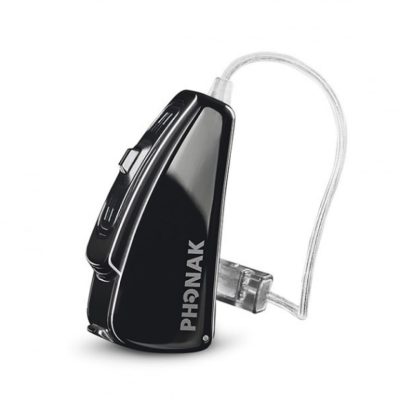
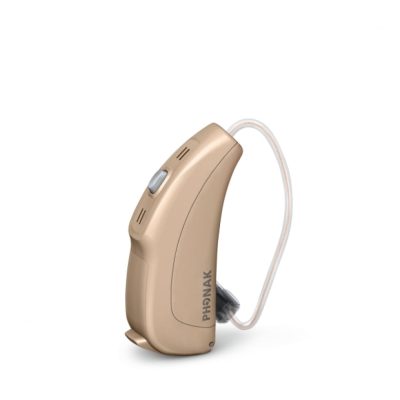
Phonak Audéo Q RIC (Quest) refers to Phonak’s Audéo Q generation built around a RIC / RITE design (Receiver-In-Canal / Receiver-In-The-Ear). In a RIC model, the speaker (receiver) sits in the ear canal and connects to the hearing aid behind the ear via a thin wire. This design is popular because it’s discreet, comfortable, and makes it easy to replace wear parts such as the receiver, dome and wax protection.
How accessory compatibility works for Phonak Audéo Q RIC (Quest)
For the Phonak Audéo Q RIC (Quest) series, compatibility usually depends on the receiver platform and the earpiece setup:
Receiver (speaker) type and connector – the receiver must match the model family’s connection system.
Receiver size/length – the wire length must match your ear (left/right and correct length number).
Dome type and size – domes must fit the receiver’s sound outlet and match your comfort and sound needs.
Wax protection – wax filters/guards must match the receiver/dome system used on your device.
If you’re unsure, the safest approach is to identify the receiver type currently on your hearing aid (often printed on the receiver or shown on your original packaging), then choose domes and wax protection designed for that receiver system.
Phonak Audéo Q RIC (Quest) receivers (speakers): what to look for
The receiver is the most “model-specific” part in a RIC setup. When choosing a replacement receiver for a Phonak Audéo Q RIC (Quest) hearing aid, check:
Left vs right – receivers are ear-specific.
Length – typically indicated by a number (wire length).
Power level – different output levels exist; match what you already use unless your hearing care professional advised a change.
Tip: If your current receiver is working but you’re replacing wear parts, it’s often enough to change the dome and wax protection first—many “weak sound” issues come from wax blockage rather than a faulty receiver.
Which domes fit Phonak Audéo Q RIC (Quest)?
Domes are the soft eartips that sit on the end of the receiver. The correct dome depends on your receiver system and the fit you need. In general, dome choices fall into a few common types:
Open domes – more ventilation and a more natural feel; often used for mild to moderate hearing losses.
Closed domes – more sealing than open domes; can increase bass perception and reduce feedback in some fittings.
Power domes – the most sealing option; typically used when more amplification is needed.
Even when the dome “looks right,” the attachment system matters. Use domes that are made for the same receiver family used by your Phonak Audéo Q RIC (Quest) device to ensure they lock on securely and don’t slip off in the ear canal.
Wax protection for Phonak Audéo Q RIC (Quest): avoid weak sound and dropouts
Wax protection (wax guards/filters) prevents earwax and moisture from entering the receiver. If your hearing aid sounds quieter than normal, cuts out, or sounds muffled, a clogged wax filter is one of the first things to check.
To choose the correct wax protection for Phonak Audéo Q RIC (Quest), match the filter type used with your receiver/dome setup. If you already have filters at home, compare the shape and fitting method before ordering—wax guards are not universal across platforms.
How to choose the right accessories (quick checklist)
Confirm your hearing aid family: Phonak Audéo Q RIC (Quest).
Identify your receiver: check left/right, length, and power marking.
Choose dome type: open/closed/power based on comfort and sound preference (or match your current dome).
Choose dome size: match the diameter you currently use; if between sizes, comfort and seal should decide.
Add the correct wax filters: match the exact type used by your receiver system.
Common issues & fixes for Audéo Q RIC (Quest) users
The sound is weak or muffled
Most often: wax filter is clogged, dome is blocked, or the dome is not seated correctly. Replace the wax filter and dome, then test again.
Feedback (whistling) after changing domes
The dome may be too open, too small, or not pushed fully onto the receiver. Try a slightly larger size or a more closed dome type.
The dome keeps falling off
This usually indicates a mismatch between dome system and receiver outlet, or the dome is worn/stretched. Use domes designed for your Phonak receiver family and replace them regularly.
Buy Phonak Audéo Q RIC (Quest) accessories at Japebo
At Japebo you can find replacement accessories for the Phonak Audéo Q RIC (Quest) series—so you can restore comfort and sound quality without guessing. If you’re unsure about compatibility, match your current parts (receiver markings, dome type, wax filter style) before ordering to ensure the correct fit.
FAQ: Phonak Audéo Q RIC (Quest) accessories
Are Phonak Audéo Q RIC (Quest) accessories universal across all Phonak hearing aids?
No. While some items may look similar, receivers, domes and wax protection can vary by platform and connection system. Always choose accessories compatible with the Phonak Audéo Q RIC (Quest) receiver setup.
How often should I replace domes and wax filters?
Wax filters are typically replaced when sound becomes weak or muffled (or on a regular schedule if you produce more earwax). Domes should be replaced when they feel loose, look worn, or no longer fit comfortably—many users replace them every few weeks.
How do I find the correct receiver length and side?
Receivers are marked for left/right and usually have a length number. Check the printing on the receiver wire/connector or your original packaging.
What if I order the wrong accessory?
If something doesn’t fit securely or doesn’t match your current setup, stop using it and re-check the receiver type and dome/wax filter system. Ordering based on the exact receiver platform is the best way to avoid mismatches.
