
AudioService Li-Ion G5 Charger & Battery Guide (Compatibility, Use & Buying Tips) | Japebo
If you are looking for AudioService Li-Ion G5 charging or power-related accessories, you are in the right place. This guide explains what the Li-Ion G5 system is, how compatibility works, what to check before you buy a charger or power supply, and how to solve the most common charging problems—so you can choose the correct accessory with confidence.
What is AudioService Li-Ion G5?
AudioService Li-Ion G5 refers to hearing aids and accessories built around a rechargeable lithium-ion power system. Instead of disposable batteries, Li-Ion G5 devices are designed to be charged regularly using a compatible charging solution (often a desktop charger or charging case, depending on the model).
Because charging hardware is model-specific, “Li-Ion G5” compatibility is not just about brand—it also depends on the exact hearing aid generation and the charger interface used for that product family.
Which devices are compatible with AudioService Li-Ion G5 accessories?
AudioService chargers and power accessories are typically compatible only with the hearing aid families they were designed for. Even within the same brand, chargers may differ by:
Charging contacts / docking shape (how the hearing aids physically sit in the charger)
Technology generation (G5 vs other generations)
Left/right orientation and casing design
Power requirements (correct power adapter/output)
Best practice: match the accessory to your hearing aid family and generation (Li-Ion G5) and confirm the exact charger name/part number if available (often found on the underside of the charger, on the original box, or in your hearing care documents).
AudioService Li-Ion G5 accessory types (what you can buy)
Depending on your setup, you may need one of these common power-related items:
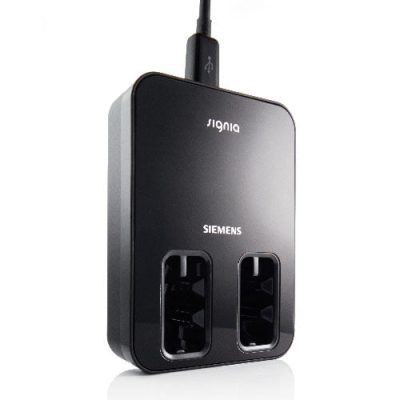
Charging station / desktop charger – for daily charging at home.
Charging case – a more portable solution (some versions can store and charge when traveling).
Power supply / USB cable – replacements for lost or damaged adapters and cables (only use the correct specification).
Cleaning/support items for chargers – to keep contacts free from dirt that can interrupt charging.
If you are unsure which type you need, start with how you charge today: if you already have a charger, replacing like-for-like is usually the safest option.
How to choose the correct AudioService Li-Ion G5 charger
Use these checks to make sure you buy the right accessory:
1) Confirm the exact “Li-Ion G5” generation
AudioService products across different generations are not always cross-compatible. If your device is labeled Li-Ion G5, choose accessories that explicitly state AudioService Li-Ion G5 compatibility.
2) Identify your current charger model (if you have it)
Look for a model name or identification marking on the charger. Matching that model is the most reliable way to ensure fit and charging function.
3) Check physical fit (docking shape)
Chargers are molded to fit specific hearing aid shells. If the hearing aids do not sit correctly, they may not charge—even if the accessory is from the same brand.
4) Use the correct power adapter
Using the wrong power supply can cause unreliable charging or damage. If you need a replacement adapter or cable, choose one specified for the AudioService Li-Ion G5 charger you are using.
Common AudioService Li-Ion G5 charging problems (and fixes)
Hearing aids do not charge / charger light does not behave normally
Check the power connection: confirm the wall socket works and the adapter is firmly connected.
Clean the charging contacts: dust or skin oils can block contact. Wipe gently with a dry, soft cloth.
Re-seat the hearing aids: remove and insert again, ensuring correct left/right placement if applicable.
Charging is slow or battery life feels shorter
Room temperature matters: lithium-ion batteries charge best in normal indoor temperatures.
Battery aging: over time, rechargeable capacity declines. If runtime is consistently reduced, the hearing aid battery may need service.
Adapter mismatch: using a non-recommended power supply can result in under-powering and slow charging.
Intermittent charging / one side not charging
Inspect the charger wells and contacts: debris can affect only one side.
Swap positions only if the charger design allows: if the “problem” follows the side, the hearing aid may need service; if it stays with the charger slot, the charger may be the issue.
When should you replace an AudioService Li-Ion G5 charging accessory?
Consider replacing the charger or power supply if you notice:
Visible damage to the cable/adapter (bends, fraying, loose connector)
Charging works only when the cable is held in a certain position
Unreliable charging across multiple outlets
Overheating of the power adapter (stop using it and replace)
Buy AudioService Li-Ion G5 accessories online
At Japebo, you can find AudioService Li-Ion G5 charging and power accessories selected to help you replace lost parts or keep your rechargeable setup working reliably. If you are uncertain about compatibility, use the information above to match your hearing aid generation and charger model before ordering.
FAQ: AudioService Li-Ion G5
Are all AudioService chargers compatible with Li-Ion G5 hearing aids?
No. AudioService chargers are often specific to a hearing aid family and generation. Choose a charger that explicitly states AudioService Li-Ion G5 compatibility and matches your model’s docking design.
Can I use a different USB power adapter with my Li-Ion G5 charger?
Only if it meets the charger’s required specifications. Using the wrong adapter can lead to slow charging or unstable performance. When in doubt, use the recommended replacement power supply for your charger model.
Why do my hearing aids charge sometimes but not always?
Intermittent charging is commonly caused by dirty charging contacts, an unstable power connection, or a worn cable/adapter. Cleaning contacts and replacing damaged power parts often resolves the issue.
How do I know if I need a new charger or if my hearing aid battery is worn?
If both hearing aids behave inconsistently across multiple outlets and after cleaning contacts, suspect the charger or power supply. If charging is stable but daily runtime is significantly reduced over time, battery aging in the hearing aids may be the cause.